FortifyData Collector Appliance
Default Credentials
The appliance ships with a default console / SSH user:
- Username:
groot - Password:
Chang3_me!
Change this password immediately after first login.
The user is a member of wheel (sudo) and docker, so it has full administrative access to the appliance. Changing the password immediately after first login is crucial for security.
The web UI is served on HTTPS port 443 behind Caddy. On first boot Caddy issues a self-signed certificate; you can switch to a publicly-trusted certificate later from the appliance menu (see TLS Configuration).
First Login
After first boot completes you can reach the appliance two ways:
- Web UI:
https://<appliance-ip>— displayed on the console login banner. The browser will warn about the self-signed certificate on first visit; this is expected, and resolved by configuring TLS (below). - Console / SSH: Log in as
grootwith the default password and runsudo passwd grootto set a new password immediately.
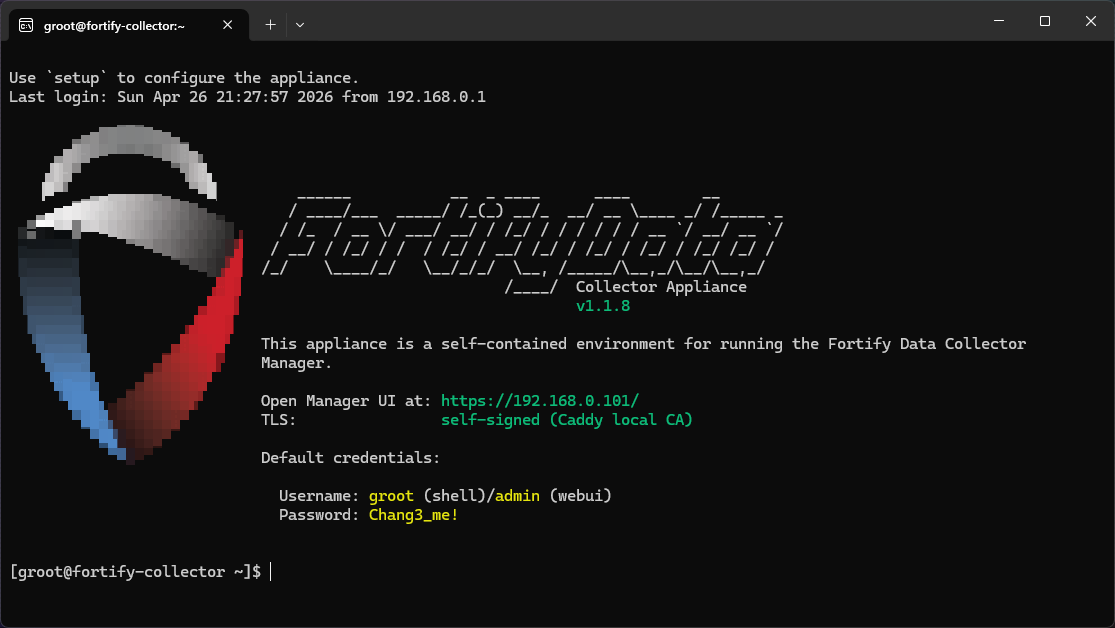
Console banner
The login banner is regenerated each minute and reflects the current IP, version, and TLS mode, so if the appliance moves networks the displayed URL stays accurate.
TLS Configuration
The appliance supports four TLS modes, switchable from the appliance menu (sudo appliance-tls-config from the console):
| Mode | Description |
|---|---|
| Self-signed (default) | Caddy issues an internal certificate. Suitable for testing or networks where users accept the browser warning. |
| Custom | Drop in your own certificate and key. |
| ACME HTTP-01 | Let's Encrypt via HTTP challenge. Requires inbound port 80. |
| ACME DNS-01 | Let's Encrypt via DNS challenge. Supports Cloudflare, Route 53, Azure DNS, and Google Cloud DNS — no inbound ports required. |
Switching modes restarts Caddy in place; the web UI is unavailable for a few seconds.
Updates
The appliance updates itself automatically:
- The base OS updates via bootc on the standard Fedora bootc cadence and reboots into the new image.
- The application containers (manager, Caddy, etc.) update via Watchtower, which polls the registry and restarts containers in place.
No manual update step is required for routine releases.